
Iron Blight Police Station Puzzle Solution
Solve the Iron Blight Police Station camera-switch puzzle with 001101, find the boat key, and check the current patch before retrying a blocked panel.
Sources and verification
On this page+
For the Iron Blight Police Station puzzle, select camera IV and set the six switches left to right to 001101: off, off, on, on, off, on. Then collect the Boat Key from the leftmost cell. The screenshot below shows the final lamp pattern, so you can compare the panel directly.
Camera IV and the six-switch setting
- 0
- 0
- 1
- 1
- 0
- 1
Left to right: off, off, on, on, off, on. The third, fourth and sixth lamps are illuminated.
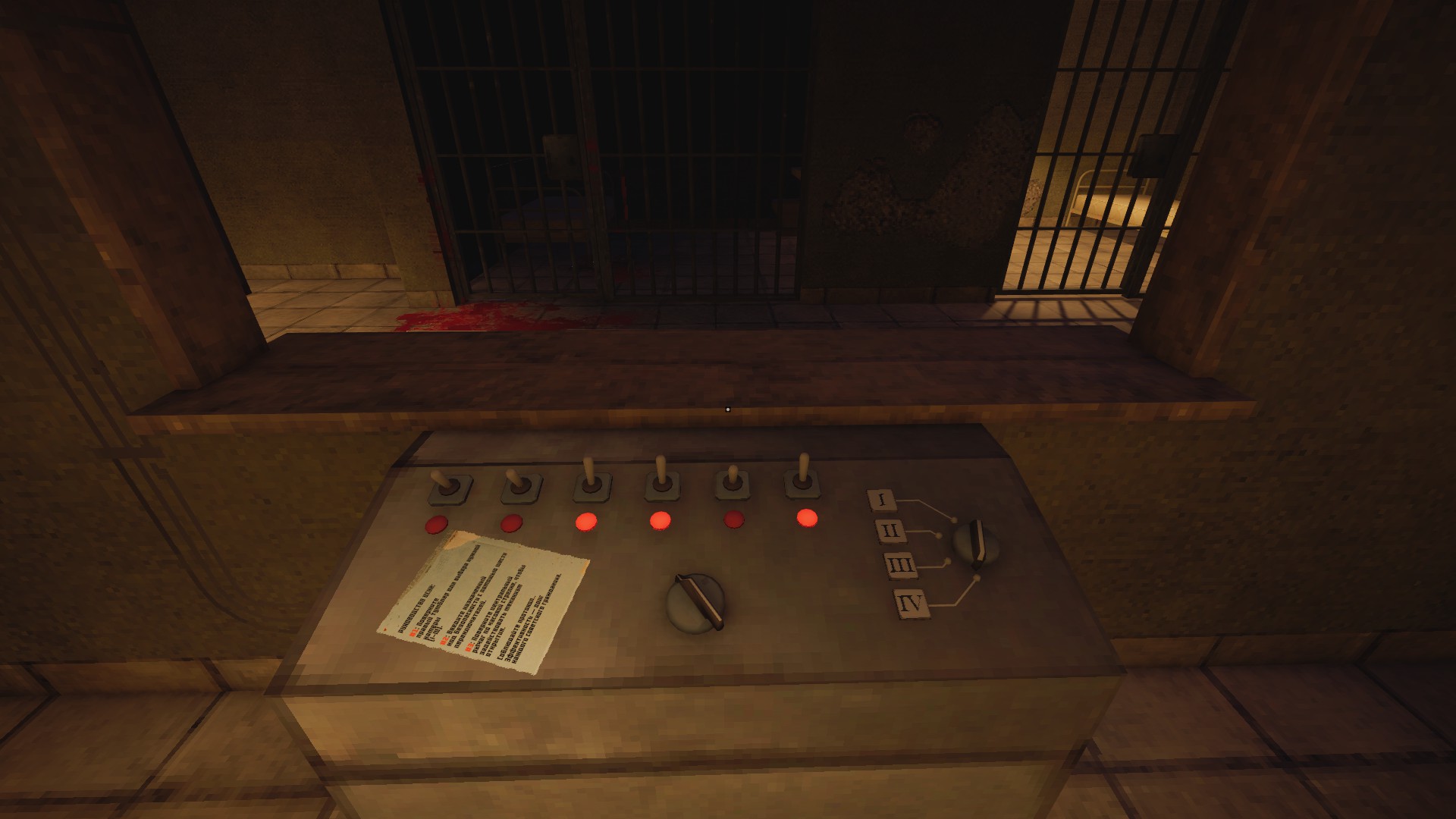
| Step | Action | Visual check |
|---|---|---|
| 1 | Reach the basement through the Police Station route | You are at the camera control |
| 2 | Select the fourth camera | Selector displays IV |
| 3 | Set the six positions to 001101 | Lamps 3, 4 and 6 are lit; 1, 2 and 5 are dark |
| 4 | Check the leftmost cell | Collect and confirm the Boat Key |
These are six final switch states, read from the left. Repeatedly pressing a switch once for each digit can leave a different pattern if the panel was already partly set. Compare the lamps after changing the controls.
After collecting the Boat Key
The documented route completes the construction-site generator and pump before the Police Station. After taking this key, return to the boat with the Air Filter and Toolbox from Village and the supermarket. The boat repair checklist separates those engine items from the Gauge, Belt and fuel used at construction.
If you are collecting attachments, the SR-3M Scope / PNV is an upstairs filing-cabinet detour. It is separate from the mandatory basement key; see the attachment locations.
If 001101 does not open the cell
- Confirm IV is the active camera, then compare all six lamps with the image.
- Wait for the panel to respond and check the leftmost cell.
- Confirm the current objective has reached the station and the preceding construction/Workshop route is complete.
- Update Steam and verify files. Check the October 17 update rather than assuming Patch 1.05 is still the last update.
- If the correct state still fails, keep the affected save and use an existing earlier checkpoint where available. The save guide explains the removal of Prasnova quick save/load.
Evidence and review
Reviewed October 19, 2026 against Danyuv's walkthrough and original panel screenshot. The selector, lamp pattern and cell follow-up are community route evidence, not a developer-issued code list. The image supports a visual solution but does not establish behavior on the October 17 build; that build was not replayed by the wiki. Report a difference with the active camera, panel, objective and installed version. For the factory machine, use the separate Punch Card solution.
Continue exploring
Related guides
Iron Blight Puzzles: Codes, Solutions and Route Help
Solve Iron Blight puzzles with direct, version-checked answers for the Punch Card machine, environmental clues, locked routes, and progression blockers.
Iron Blight Apartments Puzzle: Code and A96 Keys
Solve the Iron Blight apartments puzzle with dial settings 2-1-3-1, find the A96 connector key and B95 windowsill key, and follow the route toward the factory.
Iron Blight Punch Card Code: 45107 and Factory Route
Solve the Iron Blight Punch Card puzzle with code 45107, collect the completed card, open the factory exit and check the next Blowtorch pickup.
Iron Blight Achievements Guide: All 22 Unlocks
Track all 22 Iron Blight achievements, attempt Clay Pigeon after the October 17 update, and plan Red Express with route checks and current save advice.