
Iron Blight Apartments Puzzle: 2-1-3-1
Solve the Iron Blight apartments puzzle with dial settings 2-1-3-1, find the A96 connector key and B95 windowsill key, and follow the route toward the factory.
Sources and verification
On this page+
Set the four Iron Blight apartments dials, from left to right, to 2-1-3-1: centre/up, left, right, left. Fit the electrical component first. Then find the connector key in A.96, cross to Block B and collect the next route key from the B.95 windowsill. The numbers come from a Patch 1.05 player route and the dial directions are visible in the community screenshot; the October 17 update changes apartment bug and save behavior, so use the checks below if your screen differs.
- 2
- 1
- 3
- 1
One number per dial: centre/up, left, right, left. Set all four controls to these final positions.
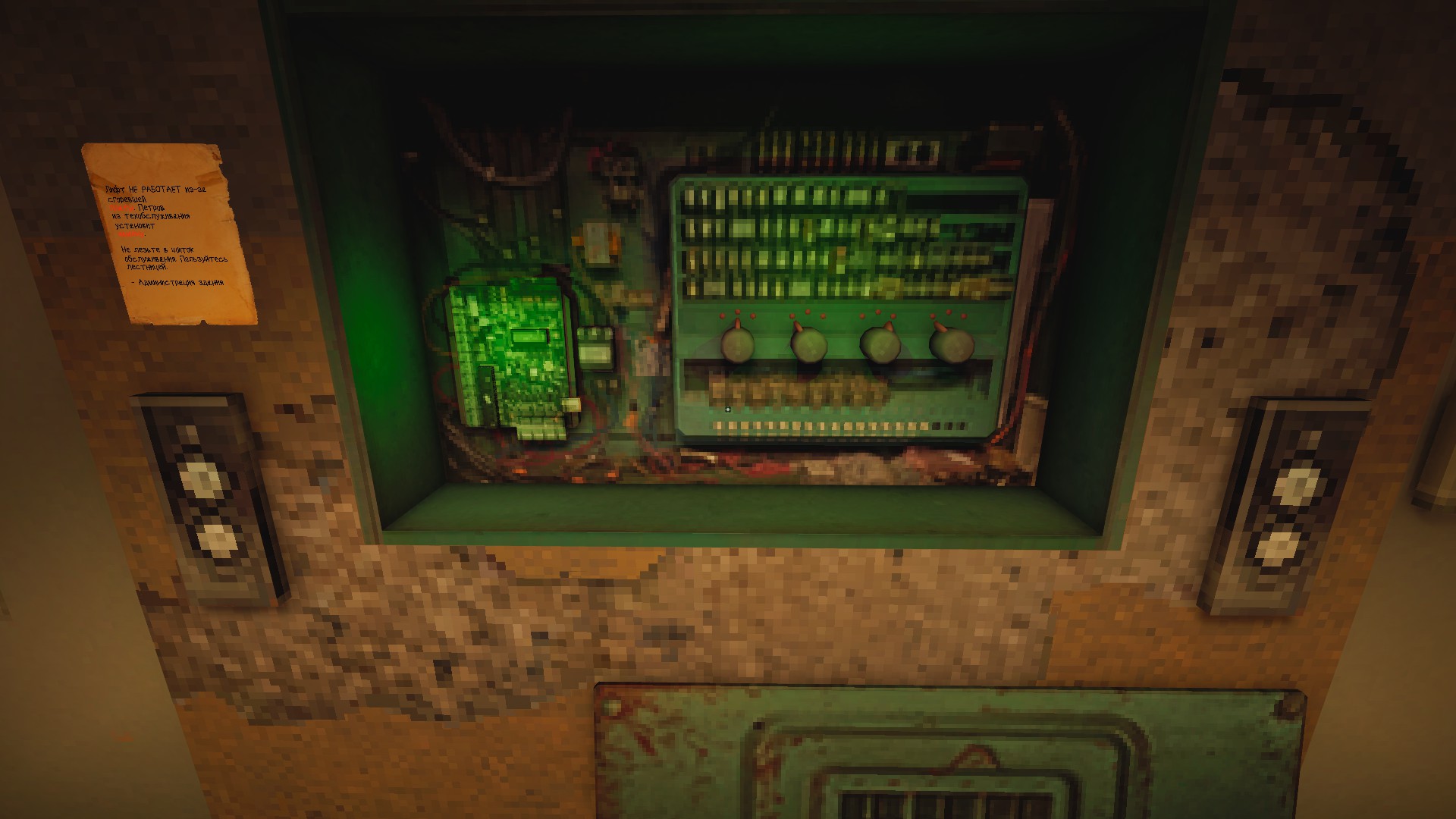
Reach the panel and fit the component
From the supermarket section, continue through the Southern district and railway approach to the residential Block A. Check the ground-floor electrical panel before searching the upper apartments: the route needs its electrical component first.
The older walkthrough places an electrical diagram in the apartment to the right; Alma's later route describes taking a board from a body in this section. Check both nearby landmarks and match the item to the panel's interaction prompt. The wiki's older Prasnova item list calls this checkpoint Circuit Board. These source descriptions are not precise enough to assign a floor-wide coordinate or assume every translated item label is identical.
Fit the requested component, then set the dials to these final positions:
| Dial, left to right | Community number | Pointer direction |
|---|---|---|
| First | 2 | Centre / up |
| Second | 1 | Left |
| Third | 3 | Right |
| Fourth | 1 | Left |
Confirm the mechanism responds before leaving for the elevator. If it does not, compare all four pointers with the screenshot and recheck the fitted component.
A.96: get the connector key
- Take the elevator up through Block A.
- From the upper landing, descend one level by the stairs and turn right.
- Check the right-hand apartments for A.96. Alma's route places the connector key in its kitchen.
- Collect the key before searching optional rooms. This is the key that advances the crossing into Block B.
- Return up the stairs, turn left and use the connector door to enter the neighboring block.
Use the apartment number and the kitchen together to identify the pickup. In the community image, a green key lies on the windowsill immediately left of the Gnom, above the radiator. Check that visible pickup rather than only the cupboards.
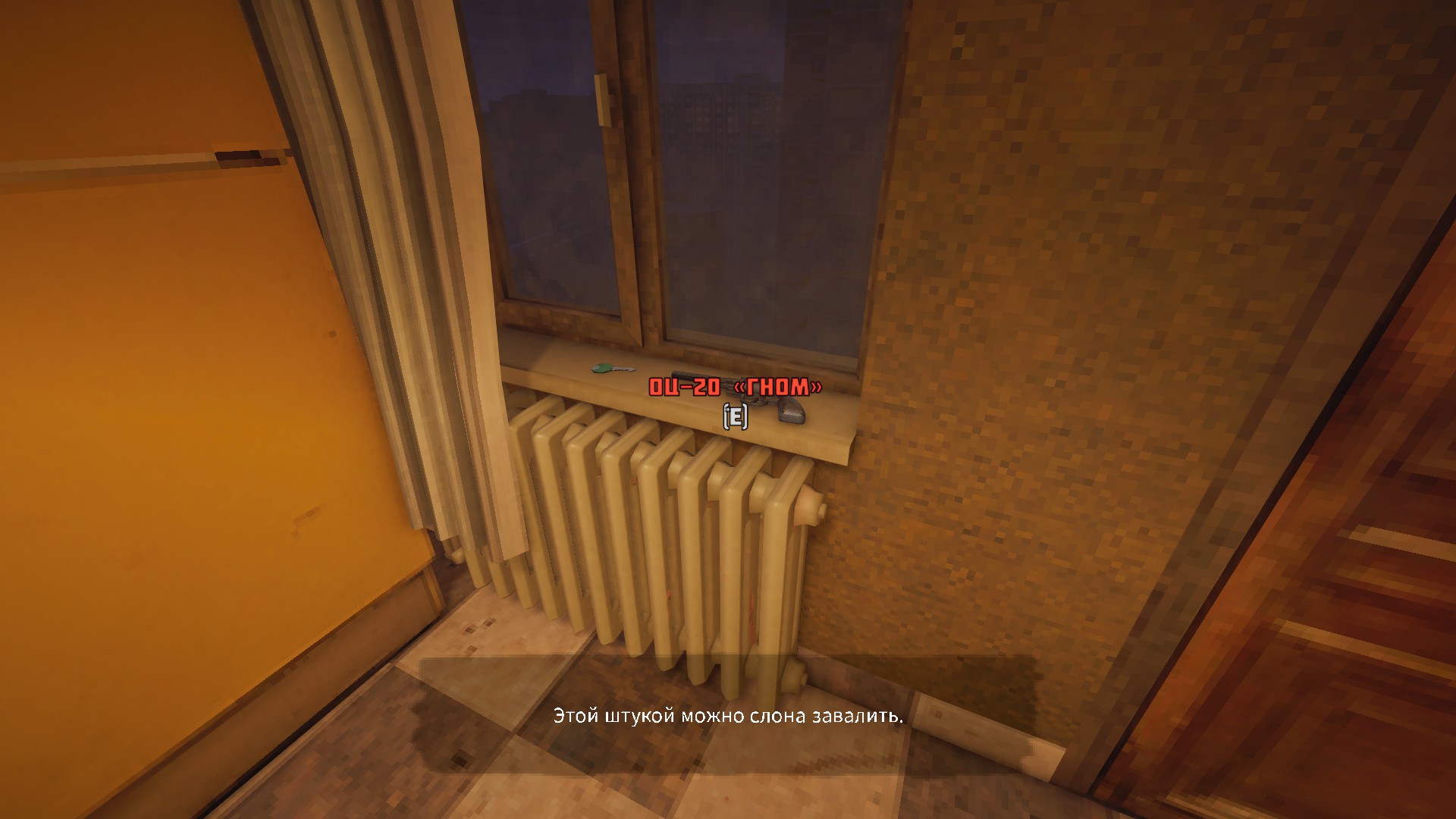
A.99 is a separate optional attachment stop; searching it does not replace the A.96 key objective.
B.95: check the windowsill before leaving
After crossing into Block B, turn right and descend a floor. Search the destination apartment's windowsill for the key used by the later workshop route. The older English and Russian walkthroughs identify the room as B.95; Alma labels it A95 while describing the same Block B descent. Follow the block, floor change and windowsill together rather than searching a different building for one letter.
- Fit electrical component
- Set dials: 2, 1, 3, 1
- A.96 kitchen: connector key
- Cross to Block B
- B.95 windowsill: route key
- Return toward the factory
A dependency checklist, not a scale map. Check each carried item before leaving its room.
| Where you are stuck | Check this next | Progress to confirm |
|---|---|---|
| Ground-floor panel does nothing | Electrical item fitted, then four dials at their final settings | Panel interaction completes and the upper route becomes usable |
| Connector door remains locked | A.96 kitchen and the carried connector key | You can cross into Block B |
| Apartment explored, but next route still locked | Destination windowsill in Block B | The second key is in your inventory |
| At the factory machine | Use the separate Punch Card code 45107 | Collect the finished card before approaching its door |
Continue to the factory and Blowtorch
Return from the apartment blocks toward the factory route. The apartment sequence and the Punch Card are separate interactions: 2131 belongs to the apartment route, 45107 to the factory machine, and 001101 to the later Police Station camera panel.
Before the drop after the Punch Card door, leave space for the Blowtorch and check the barrel in the pickup area. Carry it for the next sealed-door interactions. For the wider tool order, return to the Prasnova walkthrough.
If loading leaves you sideways or a door has no prompt
Install the October 17 update before retrying apartment loading problems: it lists a potential fix for sideways spawning. Prasnova's accidentally enabled quick save/load was also removed. Use the saves the current menu actually offers, check the checkpoint's location before loading and keep an existing earlier checkpoint if one is available. The save guide separates these changes from Save & Quit.
For a missing door prompt, first distinguish the A.96 connector key from the later windowsill key. If the correct item is carried and the prompt still fails, record the room number, objective and build for known-issues troubleshooting.
Sources and route review
Reviewed October 19, 2026. Directions and the numeric dial settings are attributed to Alma's Patch 1.05 route; Danyuv and Slavvaking supply the older room/key descriptions. Their similar walkthroughs are not treated as independent latest-build tests. The screenshots show the original community capture; the direction table and checkpoint checklist are this wiki's navigation aids. The image reveals final dial positions, so do not interpret 2131 as four successive button presses. No October 17 build was replayed by the wiki for this article.
Continue exploring
Related guides
Iron Blight Puzzles: Codes, Solutions and Route Help
Solve Iron Blight puzzles with direct, version-checked answers for the Punch Card machine, environmental clues, locked routes, and progression blockers.
Iron Blight Punch Card Code: 45107 and Factory Route
Solve the Iron Blight Punch Card puzzle with code 45107, collect the completed card, open the factory exit and check the next Blowtorch pickup.
Iron Blight Police Station Puzzle: Code 001101
Solve the Iron Blight Police Station camera-switch puzzle with 001101, find the boat key, and check the current patch before retrying a blocked panel.
Iron Blight Wiki: Survival, Puzzle and Route Guide
Use the Iron Blight Wiki to find direct answers for gameplay, routes, puzzles, weapons, key items, inventory, Prasnova locations, downloads, and reviews.